

 ENG
ENG  русский
 Español
 عربى
عربىDo I Need a Switch If I Have a Patch Panel?
2026-04-06
Content
- 1 The Short Answer: Yes, You Still Need a Switch
- 2 What a Patch Panel Actually Does
- 3 What a Network Switch Actually Does
- 4 How Patch Panels and Switches Work Together
- 5 Patch Panel vs Switch: Side-by-Side Comparison
- 6 Do You Need Both for a Home Network?
- 7 Special Cases: Patch Panels With Built-In Switching
- 8 How to Size Your Switch and Patch Panel Correctly
- 9 Labeling and Documentation: The Step Most People Skip
- 10 Common Mistakes When Using a Patch Panel and Switch Together
- 11 Summary: The Right Way to Think About Patch Panels and Switches
The Short Answer: Yes, You Still Need a Switch
A patch panel and a network switch are not interchangeable — they serve completely different purposes, and you need both for a functioning wired network. A network patch panel is a passive device: it organizes and terminates cable runs from around your home or building into one central location. It does not route traffic, assign IP addresses, or provide any active network functionality whatsoever. A switch, on the other hand, is an active device that actually moves data between connected devices.
Think of a patch panel like a telephone operator's switchboard from an old movie — it holds all the connections neatly in one spot, but nothing happens until someone (the switch) actually connects the calls. Without a switch downstream, your patch panel is just an expensive cable organizer. Devices plugged into ports on the patch panel will have no network connectivity at all.
The standard setup in nearly every wired installation looks like this: structured cabling runs from wall outlets throughout the building back to a central rack or closet, where each cable terminates at the back of the patch panel. Short patch cables on the front of the panel then connect individual ports to corresponding ports on a network switch. The switch ties everything together and connects upstream to your router or ISP gateway.
What a Patch Panel Actually Does
A network patch panel is a termination point — nothing more, nothing less. In practice, installers punch down individual conductors from each Cat5e, Cat6, or Cat6A cable into the back of the panel using a punch-down tool. This creates a permanent, solid connection between each long cable run and the panel's port. The front of the panel presents RJ45 jacks, which accept standard patch cables.
The value of a patch panel is almost entirely about organization and flexibility. Without one, you'd have dozens of cable runs dangling loose in your equipment rack or closet, each needing to be long enough to reach directly to your switch. Every time you wanted to reassign which room connects to which VLAN or which switch port, you'd be moving bulky, stiff permanent cables. With a patch panel, the permanent runs stay permanently in place, and you simply swap out short, flexible patch cables on the front.
There is no signal amplification, no data processing, and no intelligence inside a passive patch panel. Electrically, it is essentially just a set of connectors. The signal that enters port 12 on the back exits port 12 on the front, completely unchanged. This is why patch panels are sometimes called "dumb" panels — and it's also why they're extraordinarily reliable. There is almost nothing to fail.
Common Patch Panel Types
- Cat5e patch panels: Support up to 1 Gbps, suitable for older installations or budget builds where 10G isn't needed.
- Cat6 patch panels: Support 1 Gbps reliably at full length and up to 10 Gbps over short runs (up to about 55 meters). The most common choice today.
- Cat6A patch panels: Support 10 Gbps at full 100-meter runs. Larger, more expensive, and used in commercial environments or future-proofed home setups.
- Keystone patch panels: Use removable keystone jacks, offering flexibility to mix different cable types or standards in a single panel.
- Feed-through patch panels: Have female-to-female couplers on both sides, useful when you need to connect two cable runs together without a switch.
Standard patch panels mount in a 19-inch equipment rack and consume 1U of rack space per 24 ports, making them extremely space-efficient. A 48-port panel in 2U can terminate cable runs from 48 rooms or locations.
What a Network Switch Actually Does
A network switch is an active Layer 2 (and sometimes Layer 3) device that forwards Ethernet frames between connected devices based on MAC addresses. When a device plugged into port 4 of a switch wants to communicate with a device on port 17, the switch reads the destination MAC address in the Ethernet frame, looks it up in its MAC address table, and sends the frame only to port 17 — not to all ports. This is fundamentally different from an older hub, which would broadcast every packet to every port regardless.
Modern managed switches do considerably more: they support VLANs for network segmentation, Quality of Service (QoS) settings that prioritize time-sensitive traffic like VoIP or video calls, port mirroring for network monitoring, link aggregation (LACP) for bonding multiple ports into a single higher-bandwidth connection, and detailed per-port traffic statistics. An unmanaged switch simply forwards traffic automatically with no configuration interface, which is fine for small home networks.
For most home and small office setups, an unmanaged gigabit switch with 8 or 16 ports costs between $20 and $60 and provides everything needed. A managed switch with 24 ports starts around $150–$200 for entry-level models and scales up significantly for enterprise-grade hardware with 10G uplinks.
How Patch Panels and Switches Work Together
Understanding the relationship between a patch panel and a switch is key to planning any structured cabling installation. The two devices are almost always used side by side in the same rack, connected to each other via short patch cables. Here is the complete data path from a device in a room to the internet:
- A computer plugs into a wall plate in a room using a short patch cable.
- The wall plate connects to a long structured cable run (typically Cat6) that travels through walls and ceilings back to the network closet or rack.
- That cable run terminates at the back of the patch panel at a specific numbered port.
- A short patch cable on the front of the panel connects that port to a numbered port on the switch.
- The switch processes traffic and connects upstream to the router via another cable.
- The router manages internet access and connects to the ISP modem or ONT.
The patch panel is steps 3–4 in that path. Remove it and the cable runs still work — you'd just plug them directly into the switch — but you lose all the organizational benefits. This is actually common in smaller installations: if you have only 4–6 cable runs, many people skip the patch panel entirely and terminate each cable run directly with an RJ45 connector that plugs straight into the switch. The trade-off is that reassigning or troubleshooting connections becomes messier as the number of runs grows.
When Skipping the Patch Panel Makes Sense
There are legitimate scenarios where you can forgo the patch panel entirely:
- You have fewer than 6 cable runs and don't anticipate expansion.
- The cable runs never need to be reassigned to different switch ports or VLANs.
- You're on a tight budget and want the simplest possible setup.
- The installation is temporary or will be reconfigured significantly in the near future anyway.
However, even in small setups, many installers recommend a patch panel because the cost difference is minimal — a basic 12-port Cat6 patch panel costs around $15–$25 — and it dramatically simplifies future changes. Swapping a patch cable takes 10 seconds; re-terminating or re-routing a permanent cable run takes significantly longer.
Patch Panel vs Switch: Side-by-Side Comparison
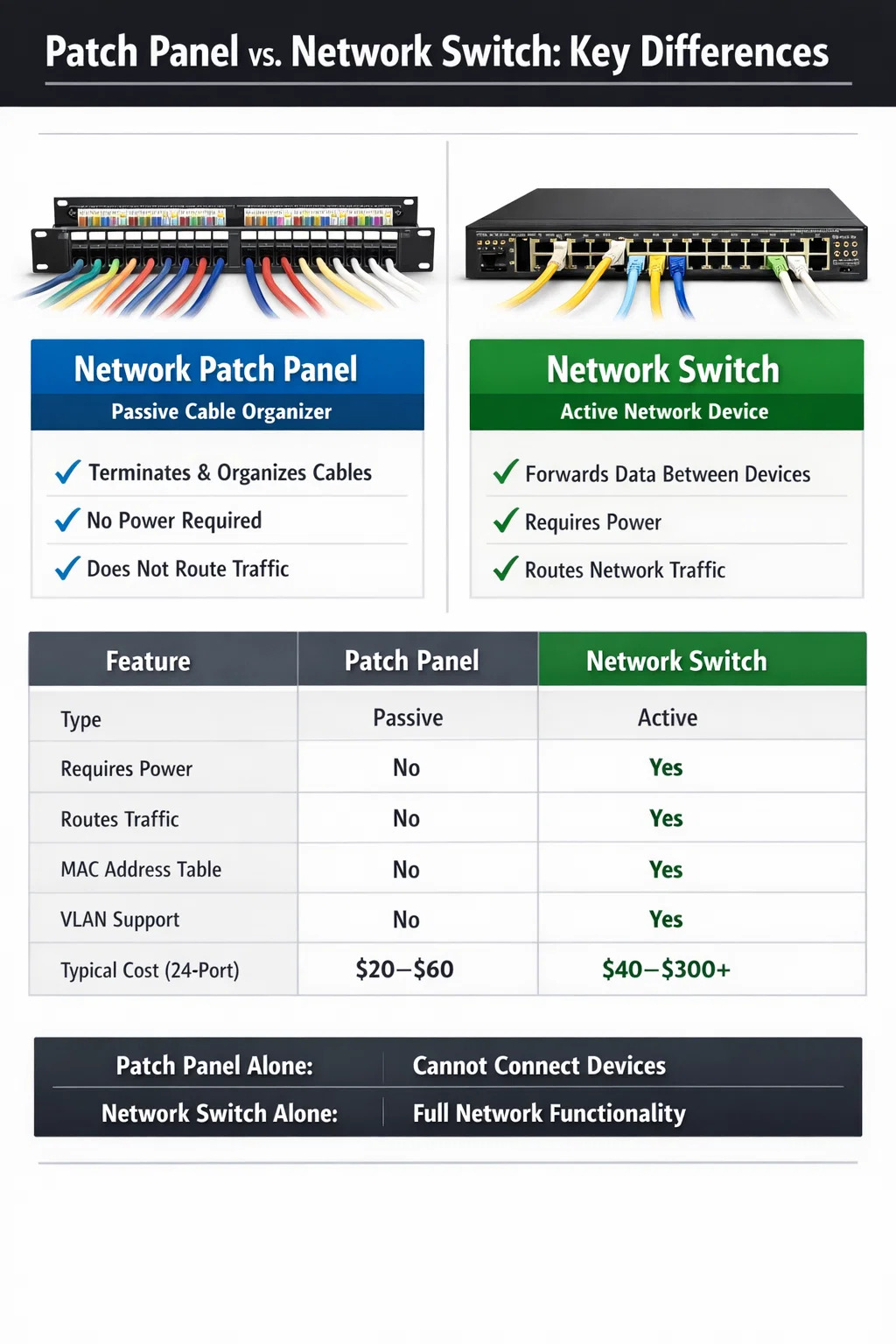
The table below summarizes the key differences between these two devices to make it absolutely clear why neither alone is sufficient for a complete wired network:
| Feature | Network Patch Panel | Network Switch |
|---|---|---|
| Active or Passive | Passive | Active |
| Requires Power | No | Yes |
| Routes Network Traffic | No | Yes |
| Primary Function | Terminate and organize cable runs | Forward data between devices |
| MAC Address Table | No | Yes |
| VLAN Support | No | Yes (managed switches) |
| PoE (Power over Ethernet) | No (passive panel); Yes (PoE panel, rare) | Yes (PoE switches) |
| Typical Cost (24-port) | $20–$60 | $40–$300+ |
| Can Network Function Without the Other | No | Yes |
Notice the last row: a switch can function without a patch panel, but a patch panel cannot provide any network function without a switch. This confirms that if you have to choose just one, the switch is the non-negotiable device.
Do You Need Both for a Home Network?
For a home network with structured cabling — meaning cable runs punched into wall outlets in multiple rooms — the practical answer is: yes, you benefit greatly from having both. But the patch panel is optional from a purely functional standpoint, while the switch is mandatory.
Here's a realistic scenario: you've run Cat6 cable to six rooms in your house. You have a living room, home office, bedroom, two spare rooms, and a garage. Each cable terminates in the utility closet where your ISP equipment lives. Your options are:
Option A: Patch Panel + Switch
All six cable runs punch down into the back of a 12-port patch panel. Six short patch cables on the front connect each panel port to the switch. The switch uplinks to the router. Total additional cost over a switch-only setup: roughly $20–$30 for a basic 12-port patch panel. Benefits: your closet is organized, cables are labeled, and reassigning any room's connection to a different switch port or VLAN takes seconds.
Option B: Direct to Switch (No Patch Panel)
Each cable run gets an RJ45 connector crimped on the end and plugs directly into the switch. This works perfectly and saves $20–$30. The downside is that each cable must be long enough to reach the switch directly and there's no flexible reassignment layer — moving a connection means physically unplugging and re-routing stiff permanent cables.
For six or fewer runs in a home setting, Option B is genuinely fine. For 12 or more runs, or any installation that might grow, a network patch panel is strongly worth the small investment.
Special Cases: Patch Panels With Built-In Switching
There are products on the market that combine patch panel functionality with switching — sometimes called "smart patch panels" or "intelligent patch panels." These are niche products aimed primarily at data centers that need to track physical-layer connectivity automatically. They use sensors and software to log which patch cable is connected to which port, helping with documentation and auditing in large environments with thousands of connections.
However, even intelligent patch panels are not network switches. They still require a downstream switch to provide actual network connectivity. They are an add-on layer of management, not a replacement for switching hardware. Prices for these systems start in the hundreds of dollars per panel and scale rapidly — they are not relevant to home or small office deployments.
There are also PoE (Power over Ethernet) injector panels that can add PoE capability to a non-PoE switch, but again, these work in conjunction with a switch, not instead of one. For most people reading this, a standard passive patch panel paired with a standard switch is the right approach.
How to Size Your Switch and Patch Panel Correctly
One of the most common mistakes in home and small office installations is buying hardware that's too small for future needs. Adding a second patch panel or switch later introduces additional complexity and cost. Here are practical sizing guidelines:
Patch Panel Sizing
- Count your current cable runs, then add at least 25–50% for future expansion. If you have 16 runs now, buy a 24-port panel.
- Standard residential patch panels come in 12, 24, and 48-port configurations. The 24-port is the most versatile for home and small office use.
- Make sure the panel category (Cat5e, Cat6, Cat6A) matches or exceeds your cable category. Mixing a Cat6A cable with a Cat5e patch panel limits your speed to Cat5e performance.
Switch Sizing
- Count your patch panel ports plus any additional devices that will connect directly to the switch (NAS, servers, WAPs). Add 2–4 ports of overhead.
- If you plan to power access points or IP cameras directly over Ethernet, choose a PoE+ switch. Standard PoE provides up to 15.4W per port; PoE+ provides up to 30W. Most modern WiFi 6 access points require PoE+ or higher.
- For home use, an unmanaged gigabit switch is usually sufficient. If you want VLANs — for example, separating IoT devices from your main network — you need a managed switch.
- Consider an SFP uplink port if you might want a 10G connection to a NAS or server in the future, even if you don't need it today.
A typical well-planned home rack for a medium-sized house might include a 24-port Cat6 patch panel, a 24-port gigabit managed switch, and a router, all mounted in a 6U or 9U wall-mount rack. Total equipment cost for this kind of setup runs roughly $200–$400 depending on brand choices and whether PoE is needed.
Labeling and Documentation: The Step Most People Skip
Having both a patch panel and a switch only pays off fully if you properly label both. The most frustrating situation in any wired network is standing in front of a rack full of patch cables with no idea which port connects to which room. A cable tester with a tone generator solves this problem if it happens, but good labeling prevents it entirely.
Best practice is to assign each cable run a number or code before you install it. For example, label every cable at both ends — at the wall outlet and at the patch panel — with the same identifier: "LR-1" for living room port 1, "OFF-1" for office port 1, and so on. Mark the corresponding patch panel port with the same label using a label maker or printed port inserts. Then document the mapping between patch panel ports and switch ports in a simple spreadsheet or network diagram.
This takes an extra 30–60 minutes during installation and saves enormous amounts of time in troubleshooting later. An unlabeled patch panel with 24 ports and a mix of identical-looking gray patch cables is nearly impossible to manage efficiently, especially if someone else has to work on the network later.
Common Mistakes When Using a Patch Panel and Switch Together
Even experienced installers run into avoidable problems. Here are the most frequent errors:
- Using poor-quality patch cables: The long permanent cable runs are usually high-quality, but people often use cheap patch cables between the panel and switch. Poor patch cables cause intermittent connectivity issues that are maddening to diagnose. Use cables rated for at least the same category as your structured cabling.
- Incorrect punch-down technique: Each conductor must be punched down in the correct position following either T568A or T568B wiring standards — and both ends of each cable run must use the same standard. Mixing T568A at the wall outlet and T568B at the patch panel produces a crossed pair and no link.
- Exceeding the 100-meter channel limit: The total channel length — permanent cable run plus patch cables at both ends — must not exceed 100 meters for Cat5e and Cat6. The patch cables at the wall outlet and at the rack both count toward this total. Keep patch cables short (0.5–1 meter at each end) to preserve as much of the 100-meter budget as possible for the permanent run.
- Buying the wrong patch panel category: As mentioned earlier, the patch panel must match your cable category. Installing a Cat5e panel on Cat6A runs is a common and costly mistake that permanently caps your performance.
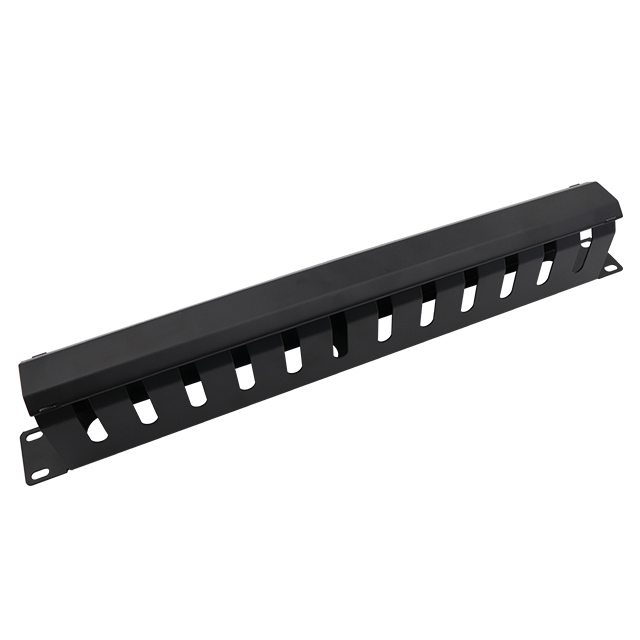
- No cable management: Without horizontal cable managers between the patch panel and switch, patch cables droop and tangle into an unmanageable mess within months. A 1U cable management panel between each piece of equipment costs about $10–$15 and is well worth it.
- Not testing runs after termination: Always use a basic cable tester on every run after punch-down, before closing up walls or pulling new cables through. Testing each run takes about 30 seconds and immediately reveals any wiring faults, open pairs, or shorts.
Summary: The Right Way to Think About Patch Panels and Switches
A network patch panel is an organizational tool for structured cabling. It is completely passive, requires no power, and provides zero network functionality on its own. A network switch is the active brain of your wired network — without it, nothing communicates. You need a switch regardless of whether you use a patch panel.
The patch panel is optional in the sense that you can run cable runs directly to a switch and skip the panel entirely. But for any installation with more than a handful of cable runs, the patch panel pays for itself in organization, flexibility, and time saved. A 24-port Cat6 patch panel costs less than $40 and makes managing a structured cabling system dramatically easier for years to come.
If you're planning a new installation, buy both. Match them to the same cable category, label everything clearly, use quality patch cables between them, and you'll have a wired network infrastructure that can serve your home or office reliably for a decade or more with minimal maintenance.
Are you ready to
cooperate with PUXIN?
cooperate with PUXIN?
Contact us to find out how our products can transform your business and
take it to the next level.

Ningbo Puxin Electronic Technology Co., Ltd. is a professional supplier of electrical engineering and integrated wiring product research and development and manufacturing.
Quick Links
Products
Keep In Touch
-

No.43 of Xiaotuanpu Road, Guanhaiwei Town, Cixi Ningbo City, Zhejiang, China
-

-

8615924366333
-

Mobile web