

 ENG
ENG  русский
 Español
 عربى
عربىWhat are the two types of patch panels?
2026-03-02
Content
- 1 The Two Types of Patch Panels: A Direct Answer
- 2 Wired Patch Panels: Pre-Terminated and Ready to Deploy
- 3 Modular Patch Panels: Flexible and Future-Ready
- 4 Side-by-Side Comparison: Wired vs. Modular Patch Panels
- 5 How to Choose the Right Network Patch Panel for Your Project
- 6 Beyond the Two Main Types: Angled, Shielded, and Blank Patch Panels
- 7 Port Density, Rack Units, and Cable Management Considerations
- 8 Installation Best Practices for Both Panel Types
- 9 Common Mistakes When Selecting a Patch Panel
The Two Types of Patch Panels: A Direct Answer
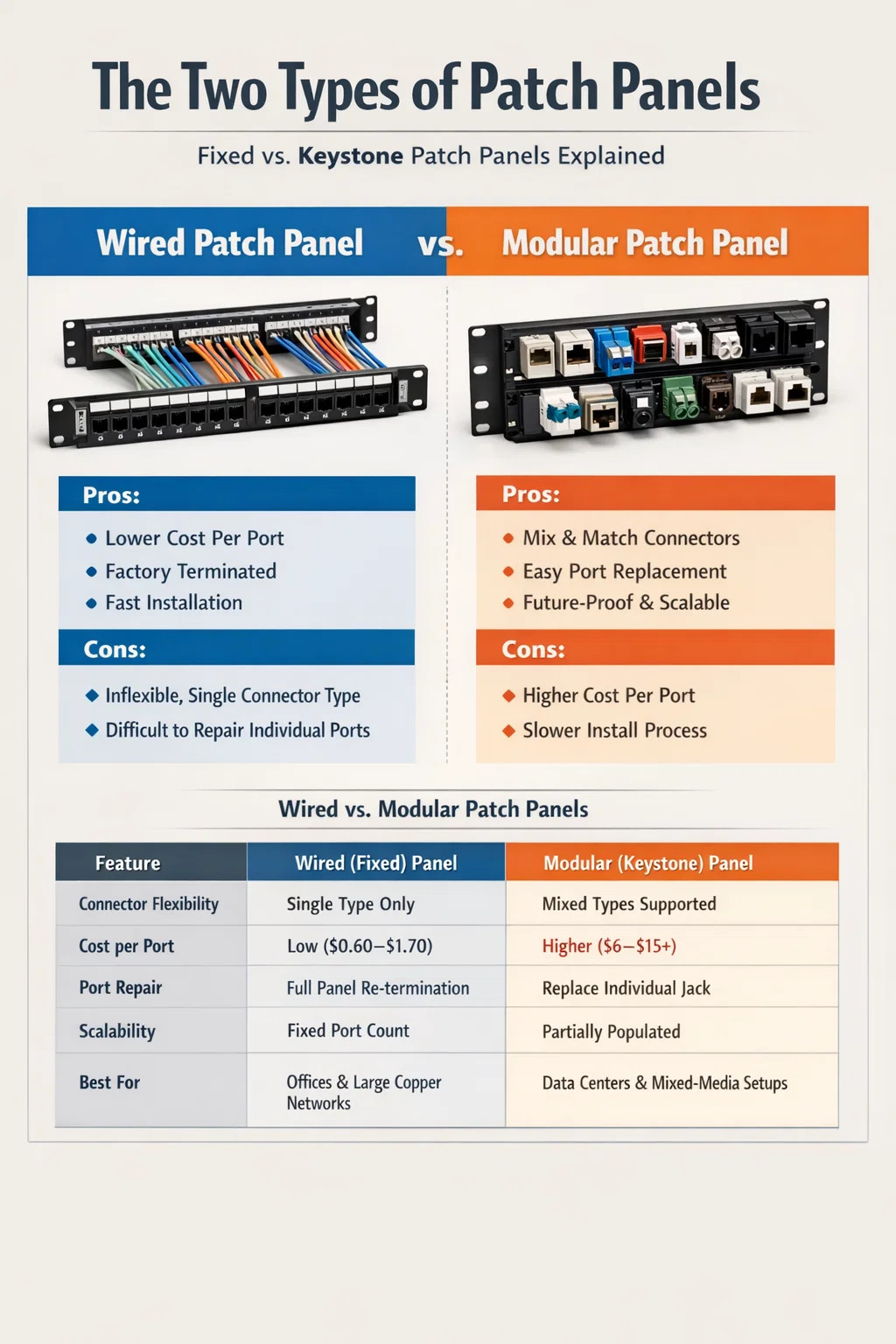
The two main types of patch panels are wired (fixed) patch panels and modular (keystone) patch panels. These two categories form the foundation of structured cabling in virtually every data center, server room, and commercial network installation. Understanding the difference between them is essential before purchasing a network patch panel or designing a cabling layout, because the wrong choice can create unnecessary cost, inflexibility, or performance issues down the line.
A wired patch panel comes with cables already terminated into the back of the panel at the factory. A modular patch panel, on the other hand, ships as an empty frame that accepts interchangeable keystone jacks, allowing the installer to choose connector types, categories, and even mix media types within a single panel. Both serve the same core function—organizing and routing network connections—but they do so in fundamentally different ways and suit different deployment scenarios.
Wired Patch Panels: Pre-Terminated and Ready to Deploy
A wired patch panel, sometimes called a fixed or punch-down patch panel, has its rear ports already terminated with 110-style punch-down blocks or similar connectors. The cable runs from the field—wall outlets, cable trays, floor boxes—are punched down directly onto these blocks using a punch-down tool. The front of the panel exposes standard RJ45 ports where short patch cables connect equipment to the rest of the network.
This type of network patch panel is the traditional workhorse of structured cabling. It is widely available in 24-port and 48-port configurations, and most models occupy either 1U or 2U of rack space. Standard options are rated for Cat5e, Cat6, or Cat6A performance, with Cat6A panels capable of supporting 10 Gigabit Ethernet over distances up to 100 meters.
Advantages of Wired Patch Panels
- Lower upfront cost per port compared to modular alternatives
- Consistent factory-level termination quality across all ports
- Simpler installation process for large-scale uniform deployments
- Proven reliability in environments with thousands of installed ports
- Wide availability from vendors including Panduit, Leviton, Belden, and CommScope
Limitations of Wired Patch Panels
The main drawback is inflexibility. Every port on a wired panel is the same connector type. If you need a mix of Cat6 copper ports alongside fiber or coax connections, you cannot achieve that within a single wired panel. Additionally, if a single port becomes damaged, replacing it usually means replacing or re-terminating the entire panel or at least that individual block. For environments where cabling requirements evolve frequently, this rigidity becomes a real operational problem.
Wired patch panels are best suited to large office deployments, school networks, and industrial environments where hundreds of identical copper runs need to be terminated quickly and cost-effectively. A typical 48-port Cat6 wired panel can cost as little as $30–$80, making it attractive for budget-sensitive projects.
Modular Patch Panels: Flexible and Future-Ready
A modular patch panel is an empty chassis, typically offered in 12, 24, or 48-port frames, designed to accept individual keystone jacks. Each slot in the frame can hold a different type of jack—Cat5e, Cat6, Cat6A, fiber LC, fiber SC, coaxial F-type, or even USB or HDMI keystone modules. This makes the modular network patch panel the most versatile option available in structured cabling today.
Installation involves snapping the chosen keystone jacks into the panel frame, then terminating each jack individually. The jacks themselves can be punched down, tool-free, or pre-terminated depending on the jack model selected. Once installed, the front face of each jack presents the appropriate port interface to the user.
Advantages of Modular Patch Panels
- Full flexibility to mix connector types within a single panel
- Easy port-level repairs: swap out a single damaged keystone jack without replacing the whole panel
- Scalability—start with a partially populated panel and add ports as needs grow
- Supports future upgrades by swapping keystone modules to higher-rated categories
- Ideal for data centers, AV installations, and multi-media environments
Limitations of Modular Patch Panels
Modular panels carry a higher cost per port. A quality 24-port modular keystone panel frame alone may cost $20–$50, and each individual Cat6A keystone jack can add another $5–$15 per port. For a fully populated 48-port Cat6A modular panel, total component costs can reach $300–$600 or more, compared to under $100 for an equivalent wired panel. Labor time is also higher, since each jack must be individually terminated and snapped in place.
Performance consistency also depends on the quality of the individual keystone jacks selected. Mixing low-quality third-party jacks in a branded panel frame can produce inconsistent crosstalk and insertion loss measurements, potentially failing channel certification tests. Always use jacks and frames from the same manufacturer's tested and certified system whenever possible.
Side-by-Side Comparison: Wired vs. Modular Patch Panels
The table below summarizes the key differences to help you decide which type of network patch panel suits your project requirements.
| Feature | Wired (Fixed) Panel | Modular (Keystone) Panel |
|---|---|---|
| Connector Flexibility | Single type per panel | Mixed types supported |
| Cost per Port | Low ($0.60–$1.70) | Higher ($6–$15+) |
| Port Repair | Requires re-termination or panel replacement | Replace individual keystone jack |
| Installation Speed | Faster for large uniform runs | Slower due to individual jack prep |
| Scalability | Fixed port count | Partially populated panels possible |
| Best For | Offices, schools, large copper deployments | Data centers, AV, mixed-media setups |
| Upgrade Path | Replace entire panel | Swap individual jacks |
How to Choose the Right Network Patch Panel for Your Project
Choosing between a wired and modular network patch panel comes down to four practical factors: budget, media variety, anticipated growth, and maintenance expectations. There is no universally superior option—both types are deployed successfully in professional installations every day.
Budget-Driven Projects
If the project involves terminating 100 or more copper runs of the same category and cost control is a priority, wired patch panels deliver better value. A school network deploying 200 Cat6 drops across 8 panels will save $1,000–$2,000 in parts alone by choosing wired over modular. That savings can be redirected to managed switches, better cable, or additional access points.
Mixed-Media and Data Center Environments
Data centers routinely combine copper Ethernet, fiber uplinks, and sometimes coaxial or audio connections in the same rack. A modular network patch panel handles all of these in a single 1U frame, keeping the rack organized and reducing the number of panels needed. Many enterprise data centers standardize on modular panels specifically because they can upgrade individual fiber ports from 1G LC to 10G LC or 25G LC simply by swapping keystone modules, without re-running cables or replacing entire panels.
Maintenance and Long-Term Serviceability
In environments with high port churn—co-working spaces, hotel business centers, event venues—individual keystone jacks take physical abuse from repeated plug-in and plug-out cycles. A modular panel allows a technician to replace a worn jack in under two minutes, at a parts cost of $5–$10, without disturbing any other connections. The same repair on a wired panel requires re-punching a block or replacing the whole panel assembly, which can mean 30–60 minutes of downtime per incident.
Future-Proofing and Technology Upgrades
Network standards evolve. Cat6A is now the recommended minimum for new commercial installations per TIA-568.2-D, and 10GBase-T is increasingly common even in SMB environments. If you deploy a wired Cat6 panel today and need Cat6A performance in three years, you replace the entire panel. With a modular panel, you swap the keystone jacks while keeping the frame. That distinction matters less in a 24-port closet but becomes significant across a 10-rack data center with 480 ports.
Beyond the Two Main Types: Angled, Shielded, and Blank Patch Panels
While wired and modular are the two fundamental categories, both types come in specialized variants that address specific installation requirements.
Angled Patch Panels
Angled patch panels tilt the front ports at 45 degrees, routing patch cables to the side rather than straight out toward the front of the rack. This dramatically reduces the bend radius stress on patch cables and keeps high-density racks significantly cleaner. Angled panels are available in both wired and modular formats and are commonly used in top-of-rack switching arrangements where cable management is critical. Some designs angle only the bottom row of ports, creating a hybrid flat/angled layout for maximum density.
Shielded (STP) Patch Panels
In environments with significant electromagnetic interference—manufacturing floors, broadcast facilities, medical imaging rooms—shielded twisted pair (STP) cabling requires a shielded patch panel to maintain the continuity of the cable shield throughout the link. A shielded network patch panel includes metallic port housings and a grounding bar that bonds to the rack's ground path. Using an unshielded panel with STP cable breaks the shield at the panel, defeating its purpose entirely. Shielded panels are available in both wired and modular types, though they carry a cost premium of roughly 30–50% over equivalent unshielded models.
Blank Patch Panels
Blank patch panels have no ports at all. They are used purely for rack management—filling empty 1U spaces to improve airflow, block dust, or provide a labeled surface for documentation. While not a functional data distribution component, blank panels are a professional finishing touch in any well-organized rack and are mentioned here because they are often grouped alongside functional patch panels in vendor catalogs and can cause confusion for first-time buyers.
Port Density, Rack Units, and Cable Management Considerations
Both types of patch panels must be evaluated not just by connector type but by how they fit into the overall rack layout. A standard 19-inch EIA rack provides 42U of usable space. Poor panel selection can waste rack units, create cable management nightmares, and make troubleshooting painful.
A 48-port 1U wired patch panel packs ports tightly and leaves little horizontal space for cable management clips. Many installers pair each 48-port panel with a 1U horizontal cable manager directly below it, sacrificing 2U per panel but dramatically improving long-term maintainability. A 24-port panel in 1U gives more horizontal breathing room between ports, making it easier to label and trace individual cables without disturbing adjacent connections.
For modular panels, the extra depth required by some keystone jack designs must be verified against the rear clearance of the rack. Some Cat6A keystones extend 2–3 inches behind the panel face, and in shallow-depth wall-mount enclosures with only 12–14 inches of depth, this can make installation physically impossible without careful pre-planning.
Labeling and Documentation Practices
Regardless of panel type, proper labeling is as important as the hardware itself. Industry best practice calls for each port to be labeled with a unique identifier that maps to a cable schedule documenting the origin point, destination, cable category, installation date, and test result reference. Most quality patch panels include a label strip channel below or above the ports. Using Brady, HellermannTyton, or similar labeling systems with heat-shrink or self-laminating labels keeps identifiers readable for 10+ years even in dusty or humid environments.
Installation Best Practices for Both Panel Types
Regardless of which type of network patch panel you choose, a set of consistent installation practices ensures channel performance meets or exceeds rated specifications.
- Maintain pair twist within 13mm of the termination point to minimize crosstalk, especially on Cat6A installations.
- Leave at least 12 inches of service loop behind the panel to allow re-termination without pulling new cable.
- Never exceed the cable's minimum bend radius—typically 4x the cable diameter for unshielded and 8x for shielded.
- Use a calibrated punch-down tool set to the correct impact level for the block type (110 vs. Krone).
- Test every channel with a certified field tester (Fluke DSX, IDEAL SignalTEK, or equivalent) to TIA-568 or ISO/IEC 11801 standards before signing off on the installation.
- Store test reports electronically and link them to the cable schedule for every port in the system.
- When using modular panels, confirm the keystone jack and panel frame are from the same tested system to protect any manufacturer warranty or certification.
Following these steps transforms a patch panel from a simple hardware purchase into a properly documented, certifiable infrastructure component that supports the network reliably for 15–25 years—the typical lifecycle of a structured cabling system installed to current standards.
Common Mistakes When Selecting a Patch Panel
Even experienced installers occasionally make selection errors that cause problems months or years after the initial deployment. The following are the most common and most avoidable.
Mismatching Panel Category with Cable Category
Installing Cat6A cable and terminating it onto a Cat6-rated panel limits the channel to Cat6 performance. The weakest component in the channel determines the rated performance of the entire link. If you are running Cat6A to support 10GBase-T or 25GBase-T, every component—cable, patch panel, keystone jack, and patch cord—must be Cat6A rated.
Ignoring Rear Cable Management
The back of a heavily populated 48-port panel can hold 48 individual cable runs. Without proper rear cable management guides, J-hooks, or cable spools, those runs become a tangled mass that makes future adds, moves, and changes (MACs) unnecessarily difficult and increases the risk of accidental cable damage during unrelated maintenance work.
Buying Non-System Components to Save Money
Using a Panduit panel frame with off-brand keystone jacks, or mixing Cat6 patch panels with Cat6A cable from a different manufacturer, breaks the tested system warranty. Manufacturers such as Panduit, Leviton, Belden, CommScope, and Legrand certify their components as systems, and that certification is only valid when components from the same family are used together. Mixing brands to save $2–$5 per port can invalidate a 25-year system warranty worth significantly more than the savings.
Underestimating Port Count Requirements
A common rule of thumb in commercial cabling design is to plan for 20–30% more ports than currently required. Organizations grow, workstations multiply, and IoT devices proliferate. Running out of patch panel ports forces either a new panel installation mid-rack or a full re-design—both of which are more disruptive and expensive than simply installing a larger panel or additional panels from the beginning.
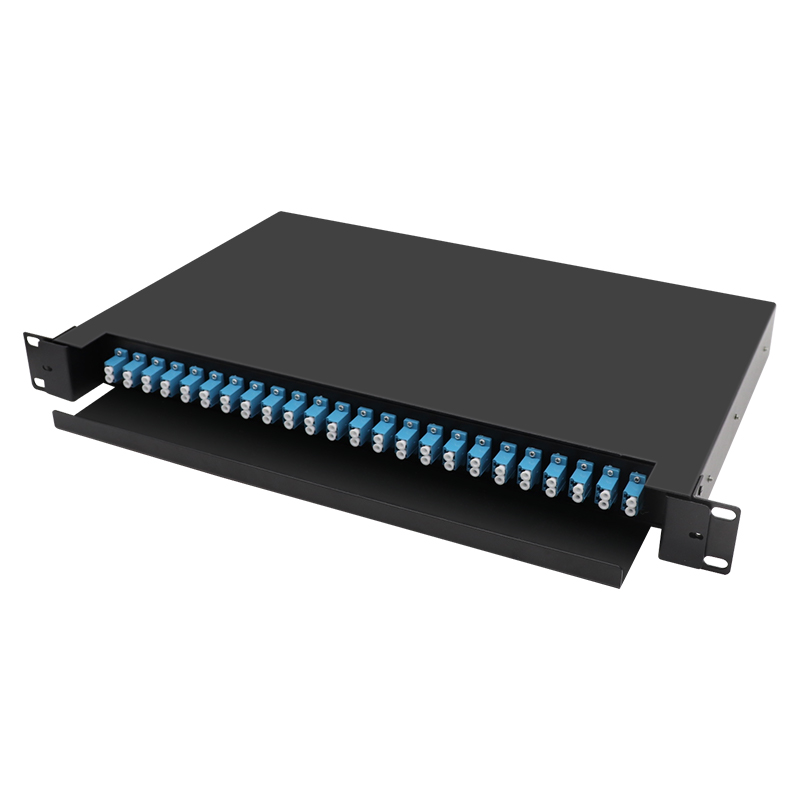
Are you ready to
cooperate with PUXIN?
cooperate with PUXIN?
Contact us to find out how our products can transform your business and
take it to the next level.

Ningbo Puxin Electronic Technology Co., Ltd. is a professional supplier of electrical engineering and integrated wiring product research and development and manufacturing.
Quick Links
Products
Keep In Touch
-

No.43 of Xiaotuanpu Road, Guanhaiwei Town, Cixi Ningbo City, Zhejiang, China
-

-

8615924366333
-

Mobile web